Create Click Mask In Godot
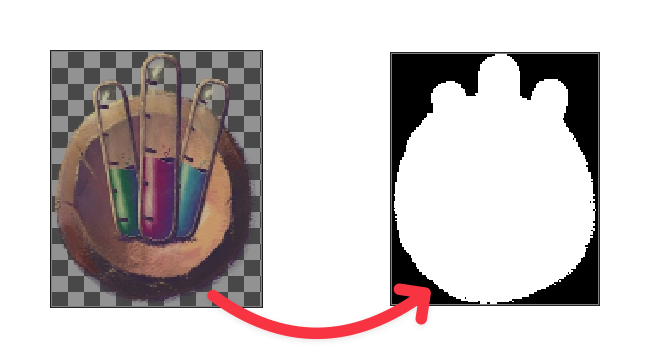
This is an editor script that creates a BitMap for the texture_click_mask property of Godot’s TextureButton.
Code
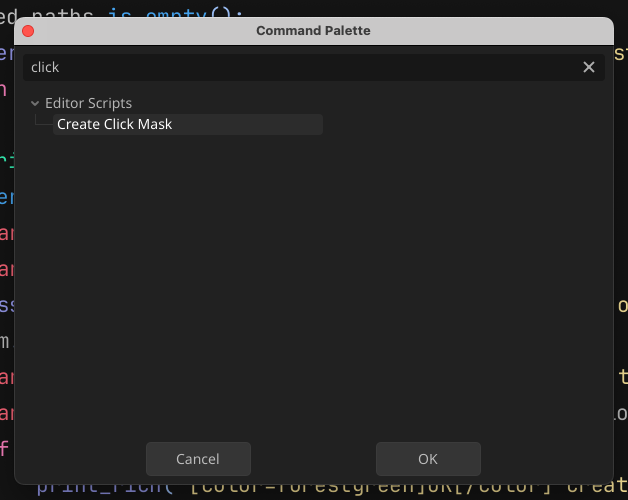
Just paste this script into your project somewhere. In recent update, named editor scripts are automatically picked up by Godot and can be run very comfortably from the command palette. So the class name is de-facto a command name, under which you’ll run the script. It’s prefixed by an underscore just so that it doesn’t pollute the namespace so much.
@tool
class_name _CreateClickMask extends EditorScript


func _run() -> void:
	print()
	var selected_paths := EditorInterface.get_selected_paths()
	if selected_paths.is_empty():
		printerr("Select one or more PNG images in the file system dock!")
		return

	for f: String in selected_paths:
		if f.ends_with(".png") and FileAccess.file_exists(f):
			var image := ResourceLoader.load(f)
			assert(image is Texture2D, "Loaded resource isn't of type Texture2D, but %s" % image.get_class())
			var bm := BitMap.new()
			bm.create_from_image_alpha(image.get_image())
			var destination := f.replace(".png", "_click_mask.tres")
			var save_error := ResourceSaver.save(bm, destination)
			if save_error == OK:
				print_rich("[color=forestgreen]OK[/color] Created click mask for", f.get_basename(), "at", destination)
			else:
				printerr("Failed to save click mask resource: %s" % error_string(save_error))
Usage
- Select an image in the file dock
- Summon command palette - for me it’s
Cmd+Shift+P - Search for “Create Click Mask”
- Press enter - your click mask bitmap will be created next to the source file